Skip to content
Triplett Full Product Catalog: Volume 27 Now Available

Country

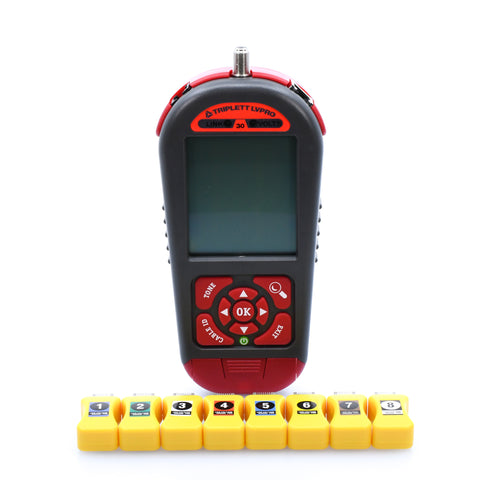
Low Voltage Pro Multifunctional Cable/Network Tester Kit with Smart Remotes - (LVPRO30SR)

Free Shipping*
SKU LVPRO30SR
614395003852
Out of Stock
Original price $799.99 - Original price $799.99
Original price
$799.99
$799.99 - $799.99
Current price $799.99

Extended Lead Time: Up to 11 business days for NIST Calibration

Product Information

  • Understanding what data and power are on a Cat5/5e/6/6a/7/8 cable is becoming increasingly important as cables are becoming crowded with a wide variety of both data devices and power sources.
  • In fact, knowing what is on a cable before plugging in can protect valuable equipment and speed up new installations.
  • The Power Panel Cat5/5e/6/6a/7/8 DVM is the right tool at the right time because once connected, it goes to work scanning each pin on a connector and displaying both the activity and the pair location (Network devices, phones or Power over Ethernet).
  • And, if you are a VoIP phone of IP camera installer, you will find the Power Panel Cat5/5e/6/6a/7/8 DVM particularly useful because you will know if there is power and a data pair available for your equipment.... exactly what you need to make your device operate.
  • There are 2 Power Panel DVMs to choose from:
  • Inline unit (P/N POE1000IL) The most popular Power Panel Cat5/5e/6/6a/7/8 DVM model.
  • Packed with features for sensing what is on a CAT5/6 cable; switches, phones, PoE power, plus interacts with these devices plus the ability to connect between 2 devices "inline".
  • Inline connections allow passing PoE power to the device monitoring the device while it is ON.
  • Also, the inline Power Panel measures and displays power draw (in watts).
  • Tone Star unit (P/N POE1000ILT) All of the features of the inline unit (above) plus we add our full-featured, filtered probe.
  • The probe is used as a wire locator to audibly trace the tone placed on the wires by the Power Panel main unit.
  • It features a tone button, volume control, ultrabright LED lighted tip, and 2 status LEDs; One to visually identify the tone and the other to warn you that there is 60hz present in the area.
  • Also, filtered to minimize fluorescent hum.

CATEGORY: LOW VOLTAGE TOOLS

  • Designed as a long term practical monitoring device, the Power Panel can remain inline between 2 devices without affecting the communication
  • Plug into any device with an Ethernet plug: computer, switch, VoIP phone, IP camera or access point; Locate the active devices and voltage on the Ethernet cable or port; Display the speed (10,100,1000), duplex and pinouts of the devices
  • Display the PoE voltage and pinouts (if PoE is present)and measure the power usage of the PoE in watts
  • Plug into any device with an Ethernet plug: computer, switch, VoIP phone, IP camera or access point

Triplett LVPRO30SR Upgradeable Cable Tester

With 12 Tester Apps and 8 RJ45 Smart Remotes for all Wire Types (COAX, CAT5/5e/6/6a/7, Shielded/Unsh

The LVPRO Series from Triplett is the tool that does it all! This industry leading cable tester is the one tester you need to run a variety of cable testing procedures including Cable Map, Ethernet Switch Port Blink, Speaker Pop, Cable Length, PoE Volts*, Battery Test, and 10/100/1000 indication*, with the ability to print results*. The LVPRO allows you be the pro in any cable testing situation. The series includes three models, the LVPRO20, LVPRO30, and LVPRO30SR. Each model is upgradable with a growing list of tester apps. The LVPRO20 is preloaded with a powerful cable testing pack and 6 device testing apps, plus Length Return Loss Quality (RLQ) Pack Apps, Alert LEDs to indicate POE, Tone Locator, Port Blink, Speaker Pop, Speaker 7.1 ID and Wall Jack ID (must be purchased separately for LVPro20 and LVPro30). It also includes RJ45/ Alligator Clip adapters, patch cable, 9V battery, and zippered, embroidered pouch. *On 30 & 30SR models only.

The LVPRO30 comes with all the same features as the LVPRO20, but it comes preloaded with 6 additional tester apps, for a total of 12. The LVPRO30 also includes 10/100/1000 detection, PoE volts, phone volts, CCTV signal, battery load test, 10 RJ45 ID's, 10 COAX ID’s, and the ability to print test results (Stores up to 250 Reports). The final model in the series, the LVPROSR, is the LVPRO30 feature pack plus RJ45 Smart Remotes (8-pieces). In addition, all of these models have a backlit screen and can be expanded with Triplett's new Test Modules that increase the form and function of an already powerful device.

  • Web upgradeable
  • Test modules available for additional features, e.g Video Test Module
  • Perform detailed wire map
  • Measure cable length and distance to open or short
  • Test Coax and RJ11 cables for faults
  • Backlit display
  • Detachable remote
  • 1 year warranty

About Triplett

Founded in 1904, U.S.-based Triplett Test Equipment continues to be on the leading edge of specialized testers. Whether supplying vital test equipment to the U.S. Signal Corps during WWII, or providing the railroad industry with essential testers to ensure the safety of their crews and the public, Triplett prides itself in developing innovative, reliable, and durable test equipment for every technician--that also won't break the bank.

Packed with Features for a Variety of Tests

Speaker Popper and Speaker 5.1/7.1 ID# Mapper

Cable Test Pack

Tone Cable Detection

Length-RLQ Pack

Speaker Popper and Speaker 5.1/7.1 ID# Mapper

Locate speakers by audibly 'popping' them. Alligator clips are included with all LVPRO models.

Properly map and label A/V speaker wires with Dolby standard color coding, using a remote kit.

Cable Test Pack

Run a multitude of cable tests, including cable diagram, pass/fail, delay, skew, Ohms, and 1% HQ length.

Tone Cable Detection

Place a tone on one end of a cable and detect it on the far end, using a remote tone probe.

Length-RLQ Pack

Measure length with the Cable Test App for all wire types, using built-in VOP values or cable-specific calibration.

Loaded Battery Test

Port Blink Cable Detection

PoE/Pairs

CCTV/Vpp (Peak to Peak Voltage)

Loaded Battery Test

Test alarm system and other backup batteries by placing a 100ma load on the battery during the test.

Port Blink Cable Detection

Locate a cable connection to a switch port by blinking the switch's Link LED.

PoE/Pairs

Detect PoE voltage and display its amplitude and location on the cable, midspan, endspan, or both.

CCTV/Vpp (Peak to Peak Voltage)

CCTV systems require a minimum Vpp to properly DVR. Measure and display Vpp of the video signal.

10/100/1000 Detection/Display

Alert LEDs

LVPro Manager Software Printing

LVPro Manager Software Upgrade

10/100/1000 Detection/Display

Plug into any active port on a computer, switch, VoIP, or access point and display its data capabilities.

Alert LEDs

Detect Link pulses from network devices and volts from voltage-oriented tests.

LVPro Manager Software Printing

Store up to 250 tests of all cable types for printing. USB Cable and software are included.

LVPro Manager Software Upgrade

Add test apps to the LVPro via the LVPro Manager Software.

Choose the LVPRO Cable Tester That's Right for You

  LVPRO20 LVPRO30 LVPRO30SR
  LVPRO20 LVPRO30 LVPRO30SR
Cable Test Pack (All Types) and Length Pack ✓ ✓ ✓
Wall Jack ID ✓ ✓ ✓
Speaker Popper and Speaker 7.1 ID# Mapper ✓ ✓ ✓
Tone Cable Detection and Return Loss Quality ✓ ✓ ✓
Port Blink Cable Detection and Alert LEDS (Links, Volts) ✓ ✓ ✓
10/100/1000 Detection/Display   ✓ ✓
PoE/Pairs, Phone, and Loaded Battery Tests   ✓ ✓
CCTV/Vpp (peak to peak voltage)   ✓ ✓
Print Up to 250 Reports   ✓ ✓
8 Smart Remotes     ✓
Cable Types Tested (All LVPRO models) Shielded and unshielded twisted pair. All cable categories
Coax. All types
Telephone, speaker and alarm wire 
Cable Tests (All LVPRO models) Opens, shorts, reversals, split pairs, wiremap, propagation
delay,skew, ohms. Feet and metricselectable
Advanced Cable Tests (All LVPRO models) Length and distance to fault
Adjustable and standard VOP settings for accurate length
of all cables
RLQ (Return Loss Quality)
Locating cable ends, split wires and
switch ports (Al LVPRO models)
Wall jack identifiers (RJ45, coax, and mixed kits available)
Speaker identification (Qty 8 available separately)
Port blink. LVPRO lights the LED on the port switch
Device Tests (All LVPRO models) Speakers: audible popper
Voltage Protection (All LVPRO models) DC Volts: 100V
AC Volts: 70
Length Measurement (All LVPRO models) Max (all wire types): 1000 feet (305m)
Min split pairs: 6 feet (2m)
Min RLQ: 20 feet (7m)
VOP calibration:Min cable sample 150 feet (50m)
Upgradeable (Model 20) Length and distance to fault
Adjustable and standard VOP settings for accurate length
of all cables
RLQ (Return Loss Quality)
Network Devices (Models 30 and 30SR) 10/100/1000 advertised speed and cable pairs used
PoE pairs and cable pairs used
CCTV camera video signal: measure peak to peak volts
CATV (cable TV) requires min 30mV peak to peak signal
Battery test:100mA loaded test for 12V alarm and other batteries
Printed Reports Models 30 and 30SR Stores 250 cable test reports in memory
Battery Type: 4 AA alkaline
Life: 24 to 30 hours
Auto power off: 30 minutes
Backlit Display Off and 2 brightness levels
  • Detachable Remote
  • F Male to BNC Male
  • F Male to BNC Female
  • (2) RJ45 patch cables
  • RJ45 to alligator clip adapter
  • USB cable
  • (4) AA batteries and carrying case
  • Smart Remotes
To resolve the time tracking issue on your LV-Pro tester, you need to synchronize it with the correct date and time. Connect the LVPRO to a PC, open the LVPRO manager software, and select “Tester” followed by “Tester Clock”, then choose “Set Clock”. This action should align your LVPRO's internal clock with the PC's time, ensuring accurate date and time stamps on all future tests.
In the LV-Pro-30 tester, the tests run continuously and will only pause to reset. If the unit initially shows a pass and then switches to a fail, it reflects the test resetting itself. A cable that actually fails should not show a pass at any point. This behavior is part of the tester's continuous testing process and not an indication of switching between 568B and 568A standards.
The CDM software you need is included in the zip file with the Manager software. Visit our software page at https://www.triplett.com/pages/software and download the software for any of the LVPRO models listed there. Inside the downloaded zip file, you'll find two executable files: setup.exe and cdm21216_setup(1).exe. Run and install both to get your model 30SR up and running.
While not all tone probes will work with the LVPRO30SR, some styles, such as the RWC probe, are compatible. We are in the process of transitioning to a universal style probe that will be compatible with most of our units, including the LVPRO30SR. The "Tone Probe for LVPRO Series (TVR-PROBE)" is available for purchase and is compatible with the LVPRO30SR. Here is a link to the probe: [TVR-PROBE].
The LVPRO series does not test to the ANSI/TIA standard. The unit tests continuity, length, delay, skew, and impedance.
 Need Help? Our experts are here to help you 
Contact Us